Text-to-speech app that works offline on iPhone: Speech Assistant
The Speech Assistant Team
October 2026 · 2 min read
Speech Assistant - AAC Pad is a text-to-speech app for people who can't speak, and the core of it works offline on iPhone and iPad: type or tap, and it speaks with the voices built into iOS.
What works offline?
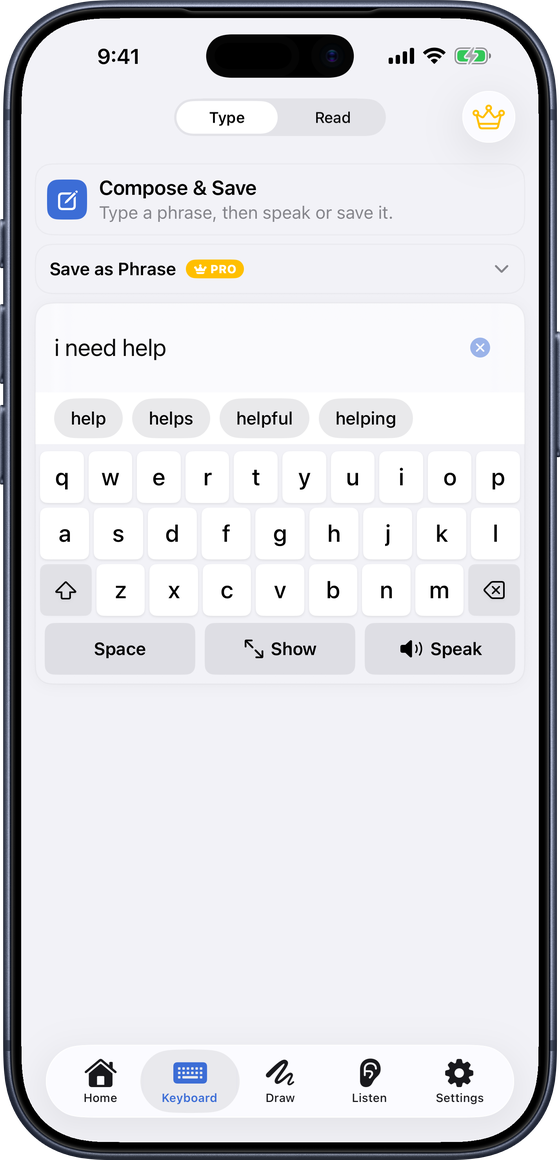
Keyboard: type anything and tap Speak. Word prediction works on the device.
Phrase boards: every tile speaks.
Show: your message full screen.
Personal Voice (iOS 17+): speaks in a voice that sounds like you.
Recordings you've made for phrases.
Read Aloud with the iPhone's voices, including scanning a page.
Head tracking: hands-free, on the device.
What needs a connection?
Listening Mode reply suggestions.
Generating natural voices for your phrases.
Sync between devices and the Apple Watch app.
Getting better voices offline
iOS Settings ▸ Accessibility ▸ Spoken Content ▸ Voices: download an Enhanced or Premium voice.
Then pick it in Speech Assistant ▸ Settings ▸ Speech ▸ Voice.
Speech Assistant is free on the App Store, with no account needed.
Questions people ask
Does Speech Assistant need Wi-Fi to speak?
No. Typing and tapping tiles speak with the iPhone's on-device voices, with or without a connection.
Can it use my own voice offline?
Yes. Apple's Personal Voice (iOS 17+) runs on the device, and recordings you've made play from the phone.
What needs internet?
Listening Mode, generating natural voices, cloud sync and the Apple Watch app.